Case picking modulePick Board · the picker app
Pallet picking moves whole pallets. Case picking is the other job: someone walks the aisle with a scanner and takes twelve cases off one pallet, eight off another. DockLedger runs that end to end.
Set it up once
Three things make it work. Pick faces — on the rack plan, click a bay and mark the ground-level slots pickers actually pick from. Case barcodes — map each product’s case barcode to the product in the barcode map on the Stock screen, per company, because two suppliers can use the same code for different things. Lanes — name the marshalling lanes where picked stock is staged before it goes out the door, on the Goods Out screen.
Build a picklist, hand it to a picker
Supply chain builds the lists in the Picklist Builder in the Supply chain suite — a product-first screen showing every product with its live position: pallets on site, cases in the pick faces, the next expiry date, filterable by name or SKU. Add cases straight from the table, point the list at a lane, and it lands on the Pick Board as Queued. Assign a picker from the card and it is on their phone. Pickers sign in with the same simple username logins as checkers: no email address, nothing to set up on the device.
The picker app
Pickers work in their own app at dockledger.co.uk/pick — built for a phone or a scanner gun, not a desk. Each line tells them the slot — the pick face holding the oldest date. There is nothing to choose: scan a case and the line is counted and ticked off, always deducting oldest-date-first, and only ever from a pick face — the system refuses a pick from reserve. If the stock is not there, the picker records a short instead of silently moving on — and the office sees it. As they build pallets they tap Record a pallet, and the board counts the pallets wrapped.
Why the deduction is automatic
A customer’s minimum life on receipt
Set Minimum life on receipt (days) on a customer in Contacts and picking honours it: stock with fewer days left than that customer needs is skipped for their orders and refused in words if nothing else in the slot covers it — “Tesco Depot needs at least 10 days of life on receipt; this pallet has 6” — rather than shipped and argued about on delivery.
The Pick Board
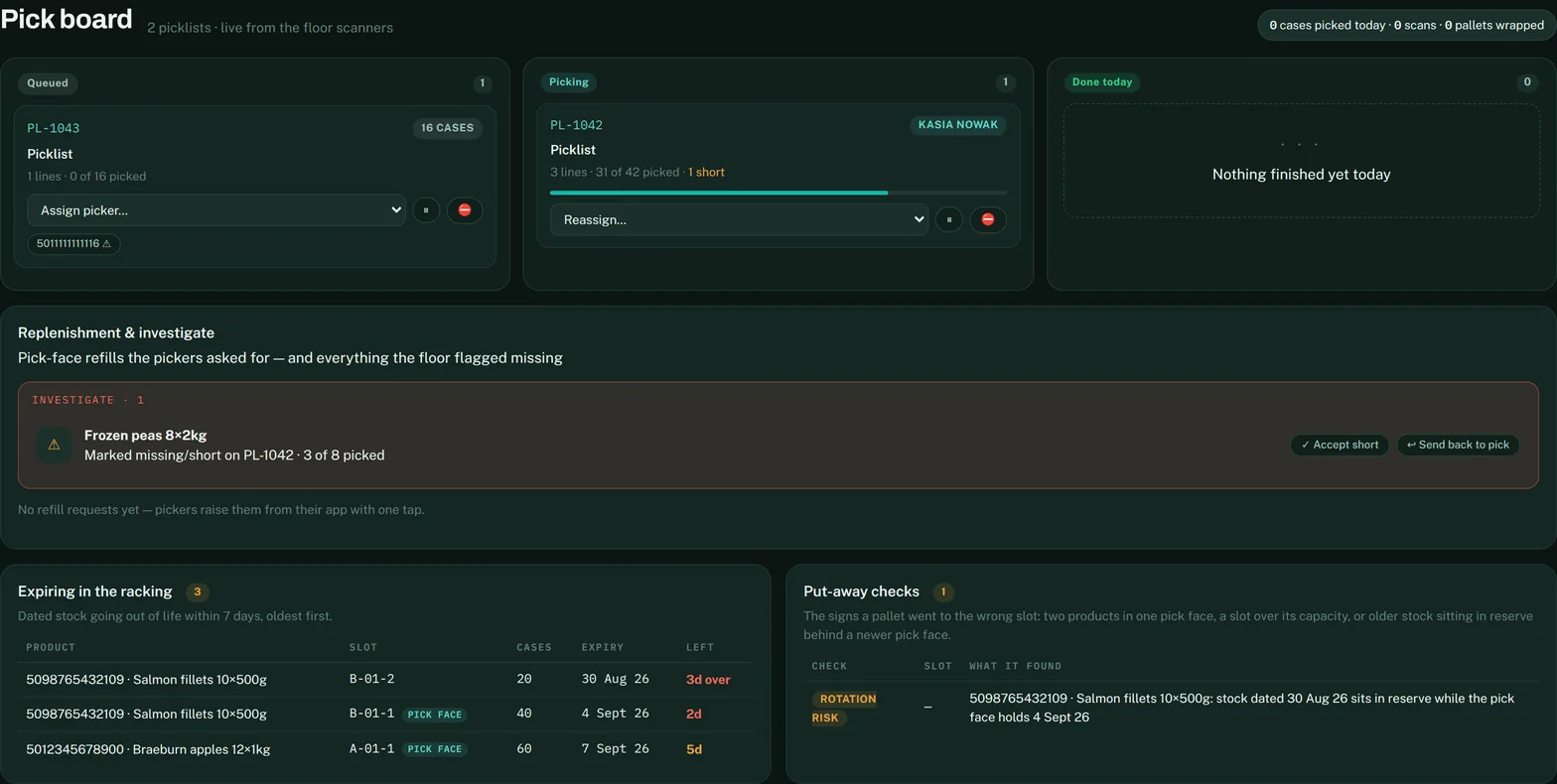
Whoever runs the floor gets their own screen: every picklist today in Queued, Picking and Done columns with live progress, reassign a picker mid-shift, and Replenishment & investigate underneath — pick-face refills the pickers asked for, and every short waiting on a decision. Accept short ships the order with what was picked; Send back to pick puts the line back on the picker’s phone. Two watchdogs sit at the bottom: Expiring in the racking lists dated stock going out of life within 7 days, and Put-away checks flags the signs a pallet went to the wrong slot — two products in one pick face, a slot over its capacity, or older stock in reserve behind a newer pick face.
Suites — one screen per job
From Users & Team, an owner or manager can lock a team member to a suite — just the screens their job uses. Someone on the Picking suite signs in straight onto the Pick Board; the Supply suite gets the Picklist Builder, buying and stock; the Goods Out suite gets the lane board and dispatch. It works on the floor logins too: a picker’s username opens the picker app and not the checker app, and neither opens the office console.