Warehouse moduleStock · Stock Takes
Stock is what is on the racking right now, line by line: on hand, allocated to picklists, free, and where it sits. Where? opens every slot holding that product. Underneath, Products is where a product code gets a human name, so 05012345678900 reads as what it actually is — add a product, rename one, and set its cases per pallet, which is the count the checker’s app suggests when a pallet plate is scanned.
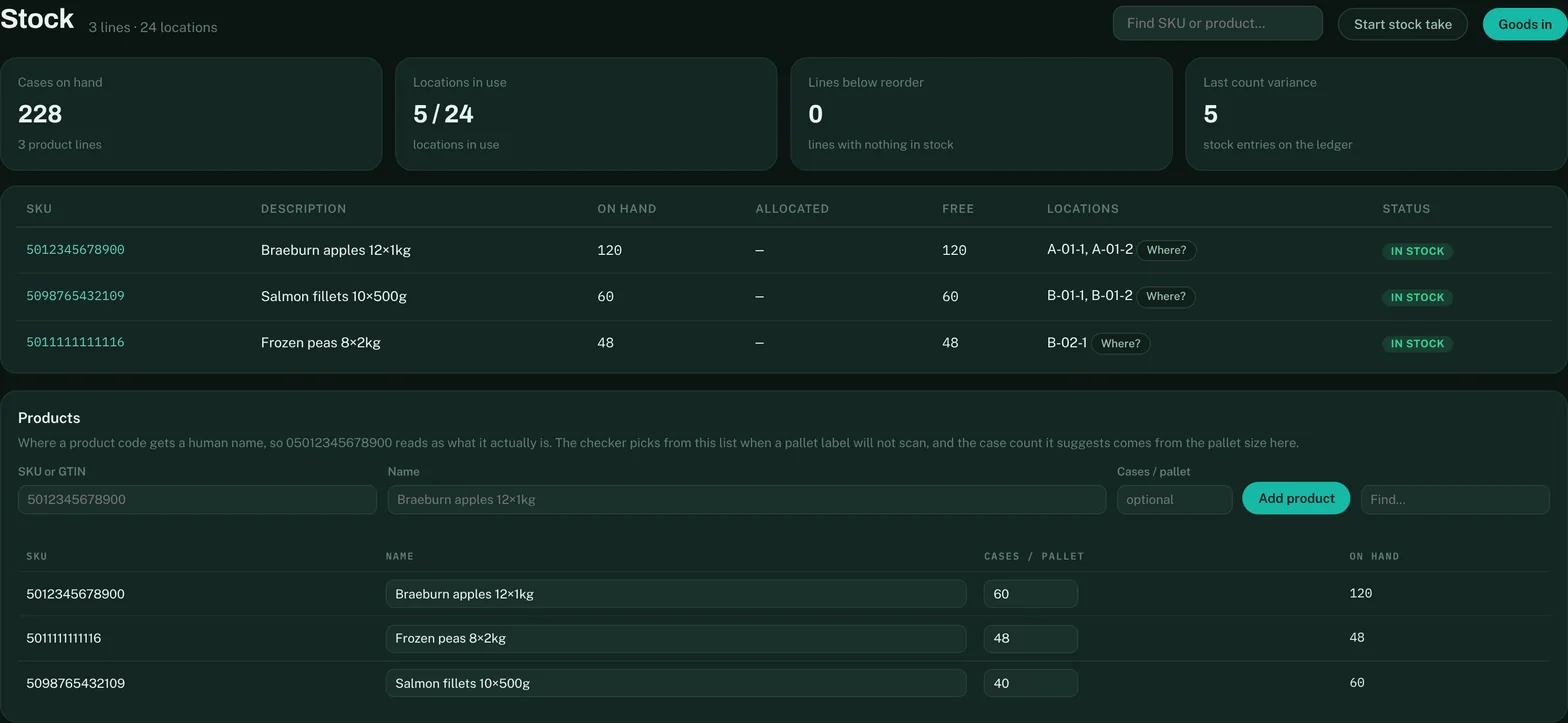
Further down: the barcode map the floor scanners resolve against, the pallet rotation described above, and Stock removed — the audit trail of every case taken off the books outside of a pick, with who, when and why. That trail is what a stock take is reconciled against.
Blind counting — the floor counts, the office watches
For a proper stock take, start a count session from the Stock Takes screen: give it a name and choose the scope — the picking faces (plus anything already flagged as suspect), or the whole warehouse. Whoever is counting opens dockledger.co.uk/count on a tablet or scanner gun, using the same simple username login as the checker and picker apps. The counting app is blind on purpose: it shows each slot and what product should be in it, but never how many — the counter types what is physically there, with no number on the screen to anchor to.
Back in the office the session screen fills in live: an overall percentage counted, progress aisle by aisle, and as counts land, a variance review sorted worst-first. Close the session and every variance is kept on record. The picking faces are where the scope earns its keep: reserve stock behind a scan trail rarely drifts, but a pick face is touched dozens of times a day, and that is where mistakes — and theft — show up first.